

How to Put a Card in Your Phone Case — Step-by-Step
You just pulled a gorgeous holographic Charizard, a chase rare you've been hunting for months, and now you want to show it off every single day. A PTCG card display phone case is the perfect solution — your favorite card travels with you, stays protected, and turns heads wherever you go. But if you've never loaded one before, you might be wondering exactly how to put a card in your phone case without damaging it.
This guide walks you through every step of the process, from prepping your case to snapping it shut, so your card looks flawless from day one. Whether you're a seasoned collector or just getting started, follow these instructions and you'll have a professional-looking display in under five minutes.
---
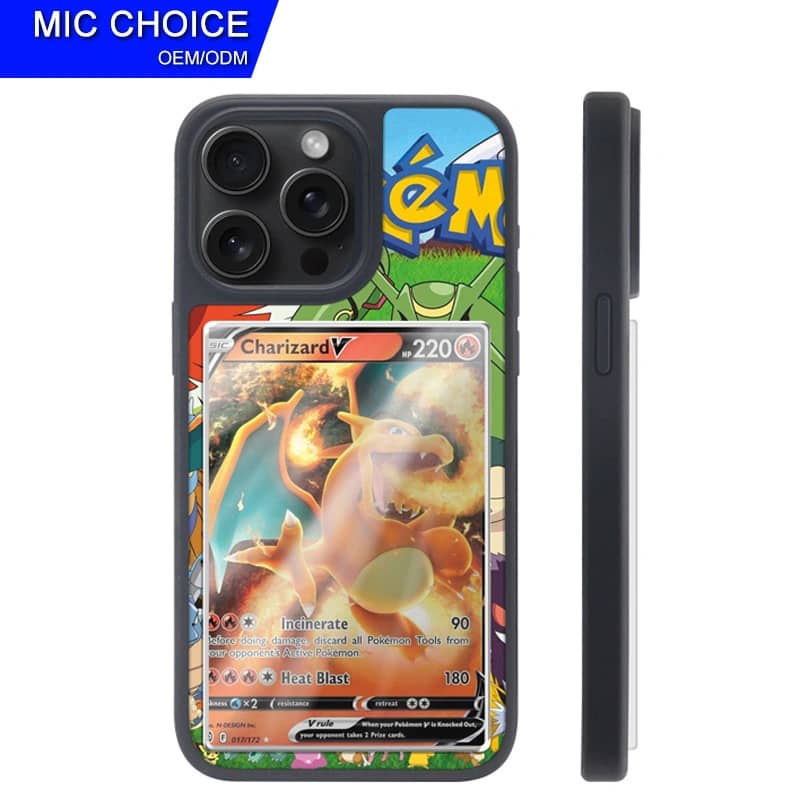
What You Need
Before you dive into the steps, make sure you have everything ready. Rushing the setup is one of the most common reasons cards end up misaligned or scratched. A quick prep check saves you a lot of frustration later.
Compatible Cases
Not every phone case is designed to hold a trading card. You need a case that features a dedicated card display window — a clear panel on the back specifically engineered to showcase a standard-sized TCG card. Generic wallet cases with card slots won't work the same way because they hide the card rather than display it.
[SuprPetrix card display phone cases](https://suprpetrix.com/collections/phone-cases) are purpose-built for Pokemon TCG collectors. Each case includes a precisely measured display chamber sized to fit a standard card perfectly, along with a crystal-clear back panel that stays transparent for 12+ months thanks to anti-yellowing technology. If you're using a SuprPetrix case, you're already set up for success. If you're using a different brand, confirm that it has a removable back panel or an accessible card slot designed for display purposes before proceeding.
Also confirm your case model matches your phone. A case that fits a Samsung Galaxy S24 won't work on an iPhone 15, even if the cards are the same size. Check the product listing carefully before purchasing.
Card Size (63x88mm)
Standard Pokemon TCG cards measure 63mm x 88mm — this is the universal size used across virtually all modern trading card games, including Pokemon, Magic: The Gathering, and Yu-Gi-Oh (standard size). If your card fits this dimension, it will fit inside a SuprPetrix display case.
Here's what fits:
- Pokemon TCG cards — all standard sets, promos, and full-art cards - Magic: The Gathering standard cards - Sports cards — many modern issues at standard size - Custom art cards — fan-made or proxy cards at 63x88mm
Oversized cards, jumbo promos, and thick graded slabs will not fit. If you're unsure, grab a ruler and measure before attempting to insert anything.
You'll also want a microfiber cloth handy for cleaning, and optionally a penny sleeve or soft card sleeve (more on that in the Tips section).
---
Step-by-Step: How to Put a Card in Your Phone Case
Follow these steps in order. Each one builds on the last, and skipping ahead can lead to fingerprints on the display window or a card that sits crooked inside the case.
Step 1: Remove the Case from Your Phone
Start by taking your phone case completely off your device. This gives you full control over the case and prevents you from accidentally dropping your phone during the process.
To remove most snap-on cases, start at one corner — typically a bottom corner — and gently peel the case away from the phone using your thumbs. Work around the edges slowly rather than pulling from the center. For SuprPetrix cases, the case separates cleanly from the back panel, so take note of how the two pieces fit together before you pull them apart.
Important: Set your phone face-down on a soft surface like a folded cloth or microfiber towel. You don't want it sitting screen-up where it could get bumped while you work on the case.
Step 2: Clean the Display Window
This step is one collectors most often skip — and it's the reason so many display cases end up with visible smudges and dust particles trapped behind the clear panel.
Before inserting your card, take your microfiber cloth and gently wipe down the inside surface of the clear display window. Use light, circular motions. You're looking to remove:
- Fingerprints from handling during shipping or unboxing - Dust particles that settled during storage - Any residue from the manufacturing process
If you notice stubborn smudges, slightly dampen one corner of the microfiber cloth with water — not cleaning spray — and wipe gently. Let it air dry for 30 seconds before moving on. Never use paper towels or rough fabrics, as these can leave micro-scratches on the clear panel over time.
The [SuprPetrix anti-yellowing display panel](https://suprpetrix.com/collections/phone-cases) is designed to stay crystal clear for over 12 months, but keeping it clean from the start helps it look its absolute best throughout that lifespan.
Step 3: Insert the Card Face Up
Now for the main event. Hold your card by the edges — avoid touching the face or the artwork if possible — and orient it so the front of the card (the artwork side) is facing toward the clear display window.
Slide the card into the display chamber gently. Depending on your case design, you'll either:
- Slide it in from the top or bottom of the display slot, or - Place it flat into a tray before the back panel snaps over it
Go slowly. If you feel resistance, do not force the card. Check that the card is aligned straight — the top edge parallel to the top of the case, the sides centered. A card that goes in at an angle will look crooked once the case is closed, and removing it again risks bending the corners.
Once the card is seated, take a moment to look at it through the display window before closing up. Is the artwork centered? Is the card sitting flat without any bowing or curling? If yes, you're ready for the next step.
Step 4: Snap the Case Back Together
Carefully reassemble the case by aligning the back panel with the main case frame. You should feel or hear a series of small clicks as the snap points lock into place around the perimeter.
Work your way around the edges methodically — start at one corner, press firmly until it clicks, then move to the adjacent corner, and continue around the case. Do not press down on the center of the display window when snapping the case shut. Pressing the middle can cause the card inside to bow or shift position.
Once all snap points are secured, give the case a gentle flex test. Hold it at opposite corners and apply very slight pressure. A properly assembled case won't flex significantly or show any gaps around the seam. If you see gaps, open the case back up and check that nothing is misaligned — sometimes a card that's slightly off-center can prevent the case from closing flush.
Step 5: Check the Display
Reattach the case to your phone and hold it up in good lighting — natural light works best. Look at the card through the display window from multiple angles:
- Straight on — Is the card centered and level? - At an angle — Are there any air bubbles, dust specks, or smudges visible? - In bright light — Does the clear panel look truly transparent, or are there hazy spots?
If everything looks clean and the card is perfectly positioned, you're done. If you spot dust or a smudge, don't worry — open the case back up, clean the window again with your microfiber cloth, and reinsert. It's worth taking the extra two minutes to get it right.

---
Tips for the Best Results
Use a Sleeve
For valuable cards — anything worth $20 or more — always sleeve your card before inserting it into the display case. A standard penny sleeve (also called a soft sleeve) adds a thin layer of protection between the card surface and the display window. This prevents micro-scratches from repeated card swaps and keeps oils and moisture from directly contacting the card.
A sleeved card still fits perfectly in a [SuprPetrix display case](https://suprpetrix.com/collections/phone-cases) — the chamber is sized to accommodate a single sleeve without distorting the card's appearance through the window.
How to Switch Cards
One of the best features of a card display phone case is that you're not locked into one card forever. Swapping is easy: remove the case from your phone, carefully open the back panel, slide out the old card, insert the new one face up, and snap everything back together. The whole process takes about 60 seconds once you've done it a couple of times.
Many collectors rotate their display card weekly or whenever a new set drops. Keep your current rotation cards in penny sleeves so they're always ready to swap in quickly.
MagSafe Check
If you use an iPhone with MagSafe accessories — chargers, wallets, mounts — confirm that your display case is MagSafe compatible before purchasing. [SuprPetrix offers MagSafe-compatible versions](https://suprpetrix.com/collections/phone-cases) of their display cases, which include a built-in magnet ring that works seamlessly with the MagSafe ecosystem without interfering with the card display. A non-compatible case won't ruin your MagSafe charger, but it won't snap onto MagSafe mounts securely either.
---
Common Mistakes to Avoid
- Inserting the card face down. The artwork should always face the clear window. A card inserted backward shows only the back design — not the end of the world, but definitely not what you intended. - Forcing a card that doesn't fit. If the card resists insertion, stop. Forcing it bends corners and can crack the display panel. Double-check your card size and case compatibility. - Skipping the cleaning step. Dust trapped under the display window is nearly impossible to remove without fully disassembling the case. Clean first, always. - Pressing on the display window to close the case. This shifts the card and can cause the panel to bow. Use the snap points around the edges instead. - Using a raw card without a sleeve for frequent swaps. Repeated insertion and removal without a sleeve will eventually wear the card's edges. Sleeve any card you plan to swap out regularly. - Ignoring yellowing on older clear cases. If your current case has already turned yellow, no amount of cleaning will fix it — the UV degradation is in the material itself. [SuprPetrix's anti-yellowing formula](https://suprpetrix.com) prevents this from happening in the first place.
---
FAQ
Will a Pokemon card fit in any phone case?
No. You need a case specifically designed with a card display window. Standard wallet cases with card slots hold cards edge-on, hiding the artwork. A dedicated display case like those from [SuprPetrix](https://suprpetrix.com/collections/phone-cases) holds the card flat behind a clear panel so the artwork is fully visible.
Can I put a graded card (PSA/BGS slab) in a display case?
No. Graded slabs are significantly thicker and larger than a raw card and will not fit in a standard display phone case. Display cases are designed for raw cards at 63x88mm, with or without a soft sleeve.
How do I keep the display window from yellowing?
Choose a case made with anti-yellowing materials from the start. SuprPetrix cases are engineered to stay crystal clear for 12+ months. Avoid leaving your phone in direct sunlight for extended periods, as prolonged UV exposure accelerates yellowing in any clear material.
Is it safe to put a valuable card in a phone case?
Yes, with the right precautions. Always sleeve valuable cards before inserting them, choose a case with a secure snap closure, and avoid dropping your phone on hard surfaces. A display case offers far more daily visibility than a binder or box — just treat it with the same care you'd give any collector's item.
Can I use a card display case with a screen protector?
Absolutely. The display window is on the back of the case, so it has no interaction with your screen protector. Both can be used together without any issues.
Where can I buy a card display phone case?
[Browse the full SuprPetrix collection here](https://suprpetrix.com/collections/phone-cases) to find a display case compatible with your iPhone or Android model. Each case is designed specifically for Pokemon TCG collectors who want their favorite cards on display every day.


